
Computer Signal Receiver Network Transmitter USB Interface Device, Black External Network Adaptor with Four Antenna for Enhanced Wireless Signal Coverage and Connectivity


Computer Signal Receiver Network Transmitter USB Interface Device, Black External Network Adaptor with Four Antenna for Enhanced Wireless Signal Coverage and Connectivity
USB Network Transmitter with Four Antennas for Enhanced Computer Connectivity

This external USB network transmitter is designed as a hardware solution for computers experiencing weak or unstable wireless connections. By utilising four external antennas, the device aims to capture a stronger Wi-Fi signal than a computer's built-in wireless card might achieve on its own. Its primary function is to act as a receiver and transmitter, potentially improving both the range and reliability of your internet connection. The simple USB interface ensures broad compatibility with laptops and desktops running common operating systems, requiring no internal hardware installation. Finished in a neutral black colour, the unit maintains a low-profile look on any desk while working to provide a more consistent network link for browsing, streaming, or general online tasks.
Features and Construction
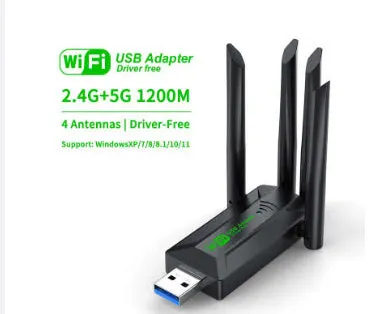
The design centres on practical functionality to address common wireless connectivity issues. The key elements are the multiple antennas and the standardised connection method, which form the basis of its operation.
Material and Build
The device is constructed with a plastic or polymer housing, which encases the internal electronic circuitry. This material choice provides a lightweight yet protective shell for the components. The build focuses on the external antenna array, which is a primary physical differentiator from basic USB Wi-Fi dongles, suggesting a design priority for signal capture.
Size and Practical Fit
While exact dimensions are not specified, the inclusion of four antennas indicates the device will have a larger physical footprint than a standard USB flash drive. Users should consider the space required on their desk or near their computer's USB port to accommodate the unit and its antenna array. The black finish helps it blend with most computer peripherals and office setups.
Uses and Placement

The transmitter is suited for scenarios where the existing computer wireless capability is insufficient. Its application is broad, covering both home and professional environments where a stable connection is needed.
Event or Professional Use
In temporary setups such as trade show booths, conference rooms, or remote workstations, where the built-in Wi-Fi of a laptop may struggle with congested or distant networks, this device can offer a dedicated and potentially stronger link. It provides a quick, tool-free hardware upgrade to improve connectivity for presentations, live demonstrations, or critical online tasks without modifying the host computer.
Everyday Home Use
At home, it is a candidate for desktop computers situated far from the router, perhaps in a home office or media room, where signal strength drops. It can also serve as a replacement or upgrade for a failing internal Wi-Fi card in a laptop, extending the machine's usable life without requiring technical disassembly. For general browsing, video calls, and media streaming, it aims to provide a more reliable connection than a weak built-in receiver.
Benefits and Buying Value

The value of this product lies in its targeted approach to a common technical problem, using a recognisable hardware enhancement—multiple antennas—to achieve its goal.
Reuse and Low Maintenance
As a standalone external device, it offers high reusability; it can be easily unplugged from one computer and connected to another, making it a portable solution for multiple machines or for users who upgrade their primary computer. Maintenance is minimal, typically involving only keeping the USB port and connectors clean and ensuring the antennas are not physically damaged.
Why Choose This Product
This network transmitter presents a specific choice for users seeking a simple, external method to address wireless issues. Its value is in the concrete feature set: four antennas for improved signal capture and a universal USB connection for ease of use. It avoids the need for opening a computer case or installing specialist software, positioning itself as an accessible step between using a computer's built-in Wi-Fi and installing a more complex internal network card or wired Ethernet connection.

